A sixth-grade class is learning how a neural network makes a prediction. One student has an IEP for a reading disability. The textbook page is dense, so her teacher gives her a simpler sheet instead. It says: “Neural networks work like the human brain.”
She finishes the sheet. She has also learned something that isn’t true.
Now picture a different fix. The student moves a weight on a slider and watches the output number change. Then she answers one question: what does the bias do that the weights can’t? She can answer out loud, with a drawing, or in one written sentence. Her reading load went down, but the idea stayed the same.
That gap between the two fixes is what this article is about. Many schools want every student to learn about AI. The risk is that “accessible” quietly turns into “easier.” When that happens, the students who most need a real understanding of AI end up with slogans.
Why accessibility is a curriculum design question
It is tempting to treat access as a support issue: add an aide, extend the time, simplify the handout. Those supports matter. But the evidence suggests that support alone does not close the gap.
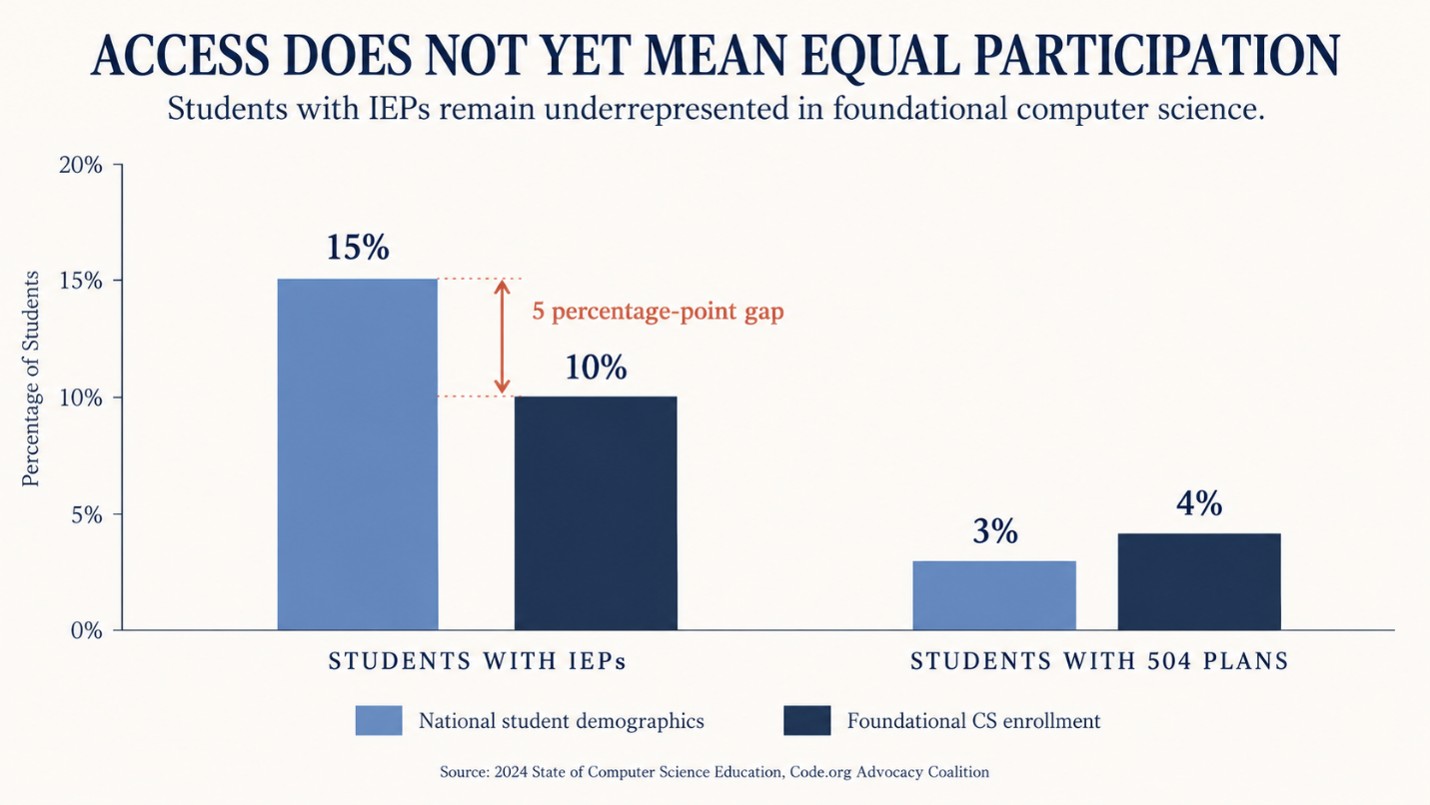
CSTA and Kapor Center researchers surveyed 2,238 PreK–12 computer science teachers across all 50 states, Washington, D.C., and Puerto Rico. The data was collected in summer 2022 and published in 2024. 32% of teachers said students with IEPs or 504 plans were underrepresented in their CS classes, and 60% said these students took part at rates that matched their school. Yet 73% of the same teachers said they felt confident or very confident teaching students with disabilities (Kapor Center, 2024).
That study covers computer science, not AI specifically. Comparable national data for K–12 AI classes is still thin. But the pattern is worth noticing: most teachers felt ready, and a third still saw a participation gap. Our reading is that teacher confidence can’t fix barriers that are built into a course. Examples are a coding prerequisite, a reading-heavy text, or a lab that needs a device not every student has. AI courses can repeat this pattern unless access is designed in from the start.
Two ways to get it wrong
Accessibility can fail in two ways. One locks students out. The other lets them in but takes the learning away. The second is harder to spot, because every student still looks busy.
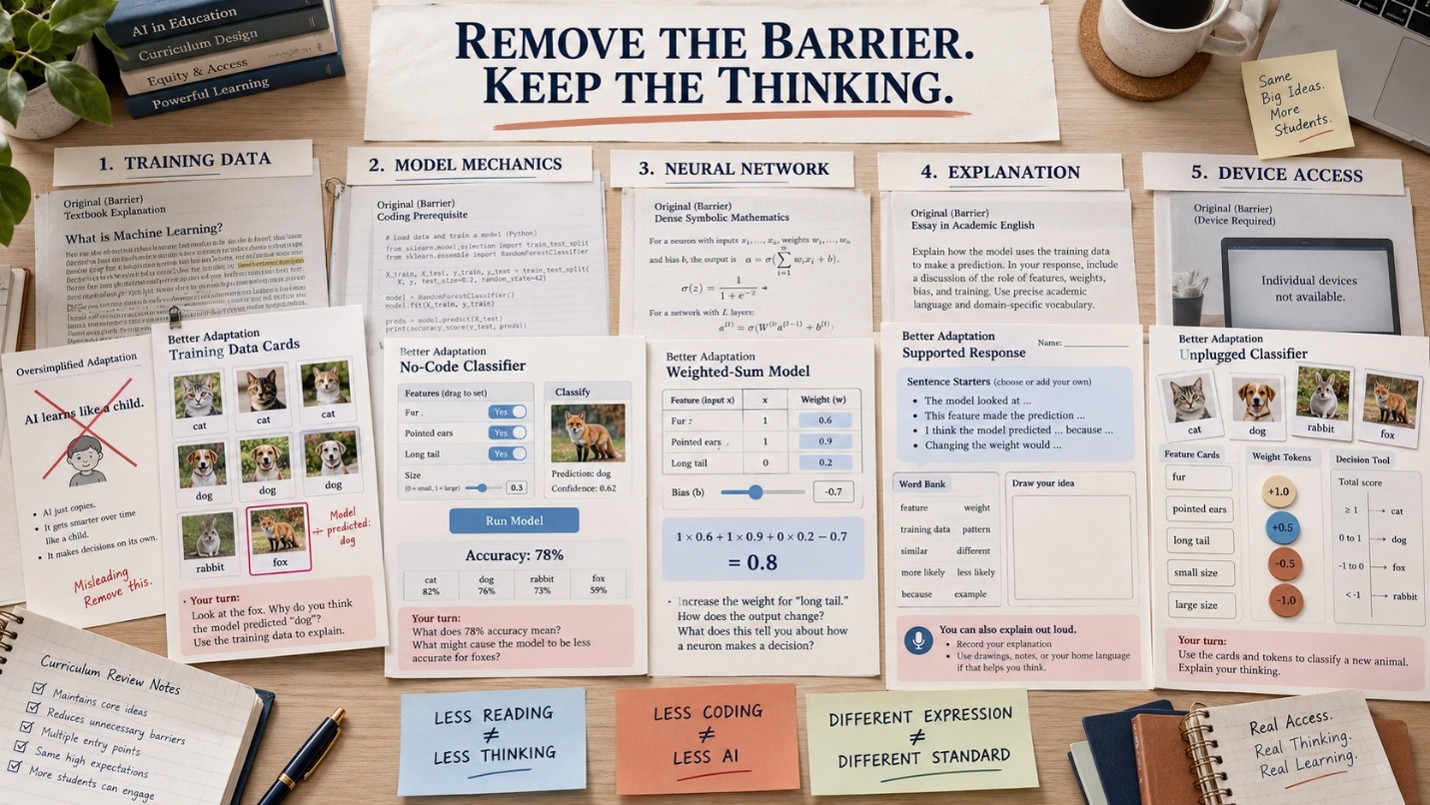
| Barrier a student meets | Lowers the challenge (avoid) | Removes the barrier, keeps the challenge |
| Dense text about training data | Replace it with “AI learns like a child” | Sort labeled picture cards, then explain why the model got one wrong |
| Can’t code yet | Skip how the model works and just use a chatbot | Train a no-code model, then read and explain its accuracy figure |
| The math looks scary | Say “it works like a brain” | Work one weighted sum with small numbers, then move a slider |
| Still learning English | Drop the explanation task | Keep the explanation, and add sentence starters, word walls and drawing |
| Not enough devices | Skip the hands-on part | Run an unplugged version of the same mechanism |
| Ready for more | Give more of the same worksheet | Ask what happens when the training data is one-sided |
The right-hand column is not softer. In some rows it asks more of the student. What it removes is the part of the task that had nothing to do with AI.
What UDL 3.0 adds
Universal Design for Learning gives US schools a shared language for this. CAST released the UDL Guidelines 3.0 in July 2024. The guidelines keep the three familiar principles: engagement, representation, and action and expression. The update puts more weight on barriers at the individual, institutional and system levels. It also names the goal of UDL as learner agency that is “purposeful & reflective, resourceful & authentic, strategic & action-oriented” (CAST).
UDL was not written for AI education, but it fits well. In an AI unit, the goal stays fixed, for example: “explain why a model makes a wrong prediction.” The way students meet the idea can vary: a slider, cards, a diagram or a hand calculation. The way they show it can vary too: speaking, drawing, writing or computing. The idea itself should not vary.
This is where many “accessible” AI lessons slip. They simplify the presentation by changing the idea. “The computer looks at the picture” is easier to say than “the computer turns the picture into a grid of numbers.” Only the second one is true.
How to make AI education accessible: four tests for curriculum leaders
1. Name the idea that must survive. Before any lesson is adapted, write down the one concept it exists to teach. For an early-grade unit, that might be: “A model learns from labeled examples, and one-sided examples give one-sided results.” If the adapted version no longer teaches that, it is not an accommodation. It is a different lesson.
2. Concrete before abstract, not instead of abstract. Hands-on work is the way in, not the end point. A student who builds a decision tree should then test it and find where it fails. Teams setting the right starting point for each grade can use a guide to judging whether an AI lesson matches students’ readiness.
3. Stage the tools, not the thinking. Coding should not be the gate to understanding AI. Young students can learn how models learn through unplugged AI teaching, then move to no-code tools, and later to running code. The thinking gets harder at each stage, even when the keyboard demand stays low.
4. Write the differentiation into the materials. If adapting a lesson depends on each teacher working it out the night before, a child’s access depends on which classroom they land in. Support and stretch moves belong in the lesson plan. This matters most for non-specialist teachers, who may not yet know which parts of an AI idea can flex and which cannot.
These tests sit inside the wider set of curriculum design principles for K-12 AI. Access is part of good design, not something added at the end.
Two questions worth asking
If an adapted lesson no longer contains the concept the unit is mapped to, has the student been accommodated, or quietly excused from the curriculum?
If a student can only reach an AI concept through code, is the barrier the concept, or the keyboard?
What this means for school and district leaders
When you review an AI program, ask to see the adapted version of a hard lesson, not just the standard one. Then check three things:
- Is the core idea still there?
- Is there more than one way in?
- Is the support written down, or left to the teacher?
Read standards claims carefully too. A program can map a lesson to a CSTA, ISTE or NGSS standard. That mapping tells you what the lesson is designed to address. It does not tell you whether a student on the adapted route actually reached it. Only assessment can show that.
FAQs
Q: What does accessible AI education mean?
A: It means every student can reach the same core AI ideas through more than one route. Examples of core ideas are how models learn from data and why they make mistakes. The route changes; the idea does not.
Q: Does making an AI lesson accessible mean making it easier?
A: No. A good adaptation removes barriers that are not part of the learning goal, such as heavy reading or a coding requirement. It keeps the hard thinking. If the core concept disappears, the lesson has been lowered, not made accessible.
Q: Can students with IEPs or 504 plans learn technical AI concepts like neural networks?
A: Yes, when the concept is broken into concrete steps. A student can work one weighted sum with small numbers, or move a slider and watch the output change. Their plan should change how they access and show the idea, not which idea they learn.
Q: Do students need to know how to code to learn about AI?
A: Not at first. Students can learn how models learn through unplugged activities and no-code tools. Coding helps later, but it should not be the gate to understanding AI.
Q: How does Universal Design for Learning apply to an AI curriculum?
A: UDL asks schools to offer multiple means of engagement, of representation, and of action and expression. In AI lessons, the learning goal stays fixed. Students can meet the idea through cards, sliders, diagrams or calculations, and show it by speaking, drawing, writing or computing.
Q: What should school leaders look for in an accessible AI curriculum?
A: Ask to see adapted versions of hard lessons. Check that the core concept survives, that there is more than one way in, that support and stretch moves are written into the plans, and that assessment checks whether students reached the idea.