A Grade 6 class watches a live demo of an image generator. The students love it. Ask any of them how the picture was made and the room goes quiet.
Was that lesson age-appropriate? For content, yes. For learning, it is hard to say. This is why age-appropriate AI education needs a stricter test than “safe and interesting”. The better question is about readiness. Can these students do something with this idea, and do they have what they need to do it?
Readiness is more than age
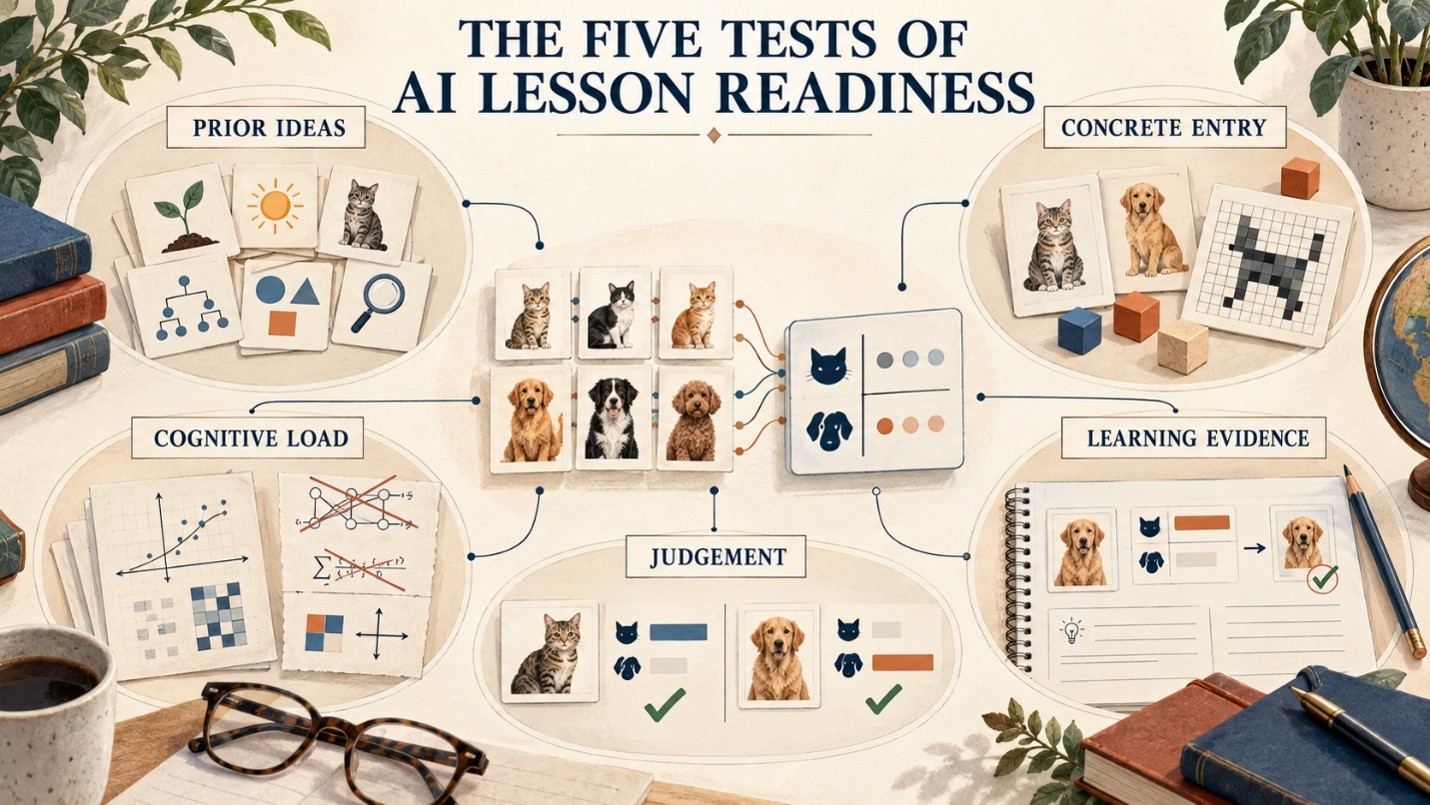
Two students of the same age can start from different places, and two lessons for the same age can ask very different things. So before a lesson reaches a classroom, curriculum leaders can judge it with five checks.
- Prior ideas. Ask which earlier idea the lesson needs and whether students have already met it. If the teacher has to re-teach a key term before the lesson can start, the students were not ready.
- A concrete way in. Check whether students can handle something real, such as cards, pixels or a small dataset, before they meet the abstract idea. A lesson that opens with a definition or a demo is a warning sign.
- Load. Look at the reading and the maths the lesson needs. If only the strongest students can follow, the load is too high for the class.
- Judgement. Ask whether students can reason about the ethical question from their own experience. If the discussion is only opinion with no evidence behind it, they are not yet ready for that question.
- Evidence of learning. Finally, ask what students will produce that shows they understood. If the only outcome is that “they enjoyed it”, nobody can tell whether they learned anything.
Start concrete, then go abstract
The safest route to a hard idea is through something students can handle. In Scholario APEX AI, Grade 6 students compute the output of a single perceptron on paper before they see one on screen. Grade 7 students slide a filter across an 8×8 patch of an image by hand before any animation runs.
Coding is staged in the same way. There is no code from KG to Grade 4. Grade 5 uses no-code tools such as Teachable Machine. In Grades 6–8 students run and read a prepared notebook.
From Grade 9 they modify and build. The curriculum states plainly that it does not claim Grade 6 students write neural networks from scratch. A good question for any programme is what its students actually type, run and calculate at each stage.
Ready does not mean easy
Readiness is not a reason to remove the hard idea. It is a reason to choose the right way in. A curriculum should make difficult ideas clearer, not make them disappear. That is the heart of making AI learning accessible without removing the challenge.
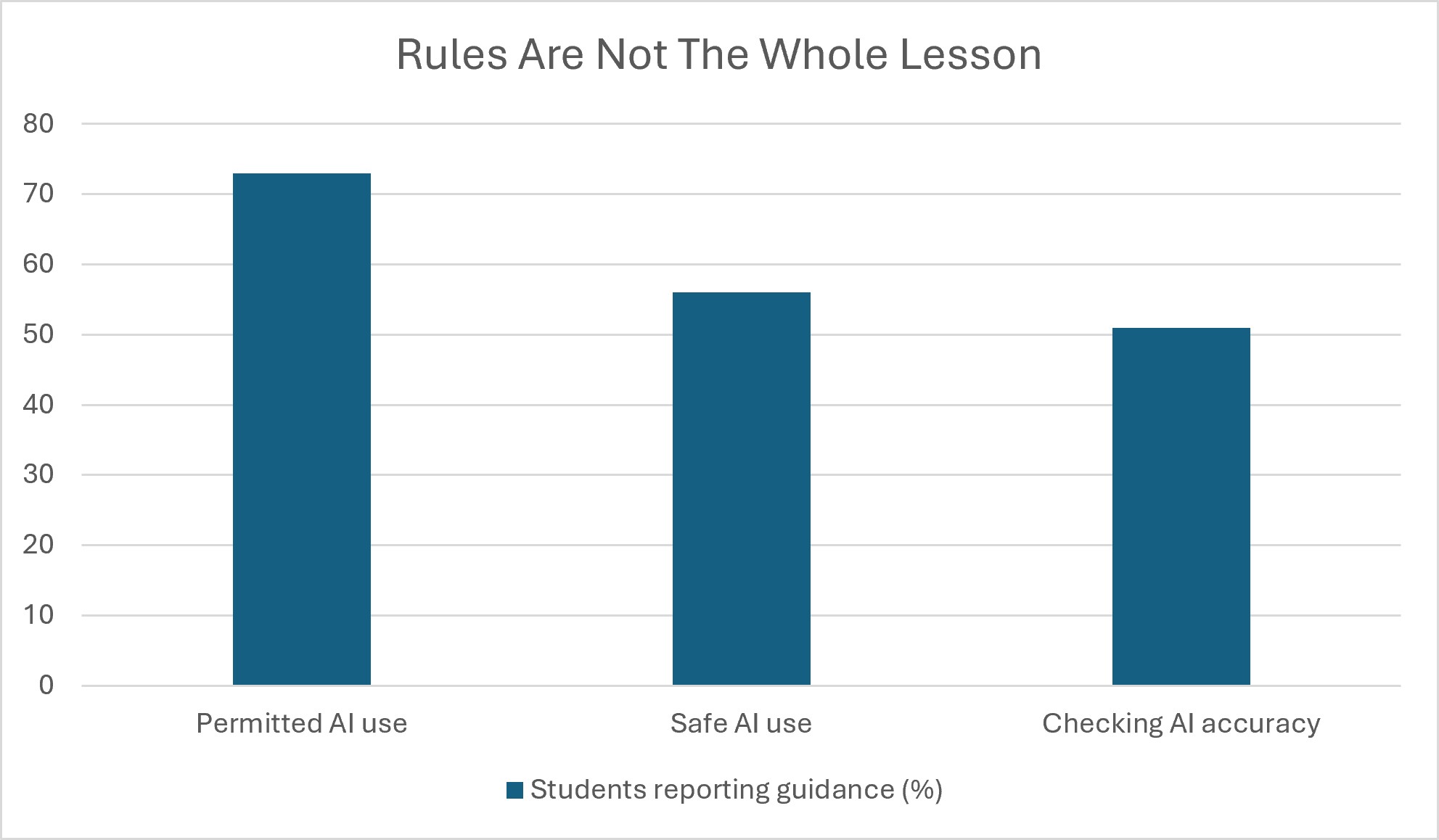
Source: Common Sense Media Census 2026
Readiness shows in what students produce
The evidence should change with age. In the early years it is observation and picture sorts. In upper primary, students build and test a classifier. In middle years they calculate and argue. In senior years they produce and defend. If a lesson for young students demands a written argument, or a lesson for older students asks only for a quiz, the mismatch is a signal.
To see how this plays out across stages, read about age-appropriate AI education from primary to secondary. Two stage-specific examples are what kindergarten children can learn about AI through play and building primary AI understanding. For the longer view, see what should deepen as students revisit AI.
If a lesson works only because the teacher explains the hard part, were the students ready, or was the teacher?
FAQs
Is “age-appropriate” the same as “simplified”?
No. Simplifying removes detail. Age-appropriate design keeps the idea and changes how students meet it, for example by using cards before code.
Can young children understand machine learning?
They can understand its first ideas: examples, labels and mistakes. The mechanism and the maths come later. In Scholario APEX AI, Grade 2 students explain training data with an analogy and train a simple classifier with teacher guidance.
Who should judge readiness, teachers or curriculum leaders?
Both. Leaders set the criteria. Teachers test them with real students. My recommendation is to pilot one unit with a class before wider adoption.